Build a recurring nanny schedule
Add your nanny's regular days and start and end times with repeat rules. Assign each shift to a caregiver and keep occasional babysitter shifts in the same calendar.
 Our Family CalendarGet started
Our Family Calendar · Childcare scheduling
Plan your nanny's weekly shifts alongside school pickups, work and family activities. Share a view-only schedule with your nanny or babysitter, then track scheduled and actual hours with caregiver timesheets.
Already have an account? Sign in
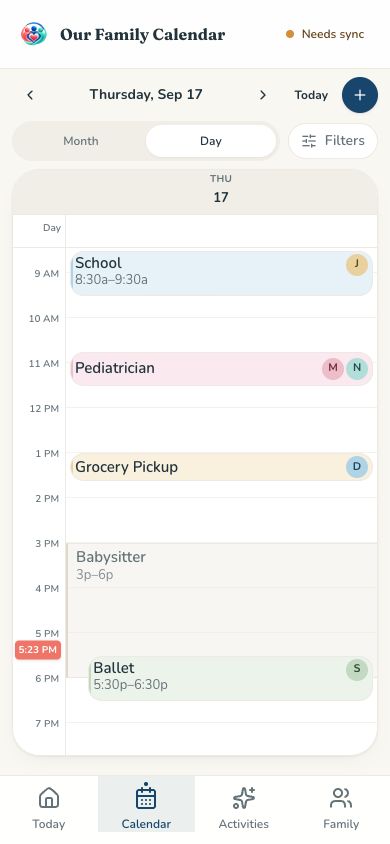
Add your nanny's regular days and start and end times with repeat rules. Assign each shift to a caregiver and keep occasional babysitter shifts in the same calendar.
Caregivers get view-only access to the schedules you allow. They can see their shifts but can't edit family events.
Caregivers can receive email summaries of their scheduled days, so there's less back-and-forth by text.
Caregiver timesheets start from the scheduled shifts. Actual hours can be reviewed and corrected when a shift runs long or ends early.
Caregivers submit their time cards and parents review and confirm them in one place.
Nanny shifts live alongside work, school pickups, appointments and sports. Compare the schedule in Day, Week or Month view to spot times when you may need additional childcare.
Scheduled shifts → actual hours → parent confirmation
When a nanny stays late or finishes early, scheduled hours and actual hours can differ. Time cards start with your scheduled shifts, caregivers record their actual hours, and parents review and confirm them. The same workflow works for babysitters, without maintaining a separate hour-tracking system.
Assign babysitter or nanny shifts on your family calendar.
Time cards are automatically prefilled from those scheduled shifts.
Caregivers adjust their actual hours when needed and submit their timesheets.
Parents review the time card and confirm the hours in one place.
Timesheets track hours only — they don't handle payroll, payments or taxes.
Yes. You can schedule babysitter shifts on your family calendar and assign them to a caregiver, who can view their shifts with view-only access.
Create nanny shifts with dates and start and end times, assign them to your caregiver, and use repeat rules for a regular weekly schedule. Shifts appear alongside your family's activities on a phone, tablet or computer.
Timesheets are prefilled from scheduled shifts. Caregivers can adjust actual hours and submit, and parents review and confirm them. Timesheets track hours only — they don't handle payroll, payments or taxes.
Only the calendars you choose. You can also limit their view to the days they're scheduled to work. Caregivers can't edit family events.
Learn more about the shared family calendar, or see how we compare to other shared calendar apps.
Family scheduling, simplified. Invite your family when you're ready.
Get started