Everyone has their own color
Know who an activity belongs to without opening every event.

Loading your calendar…
 Our Family Calendar
Family scheduling, simplified
One color-coded calendar for school, sports, work and appointments — synced with Google Calendar, with your nanny or babysitter's shifts right alongside, and caregiver timesheets parents can review and confirm.
Works with Google Calendar · Invite caregivers · No special hardware required
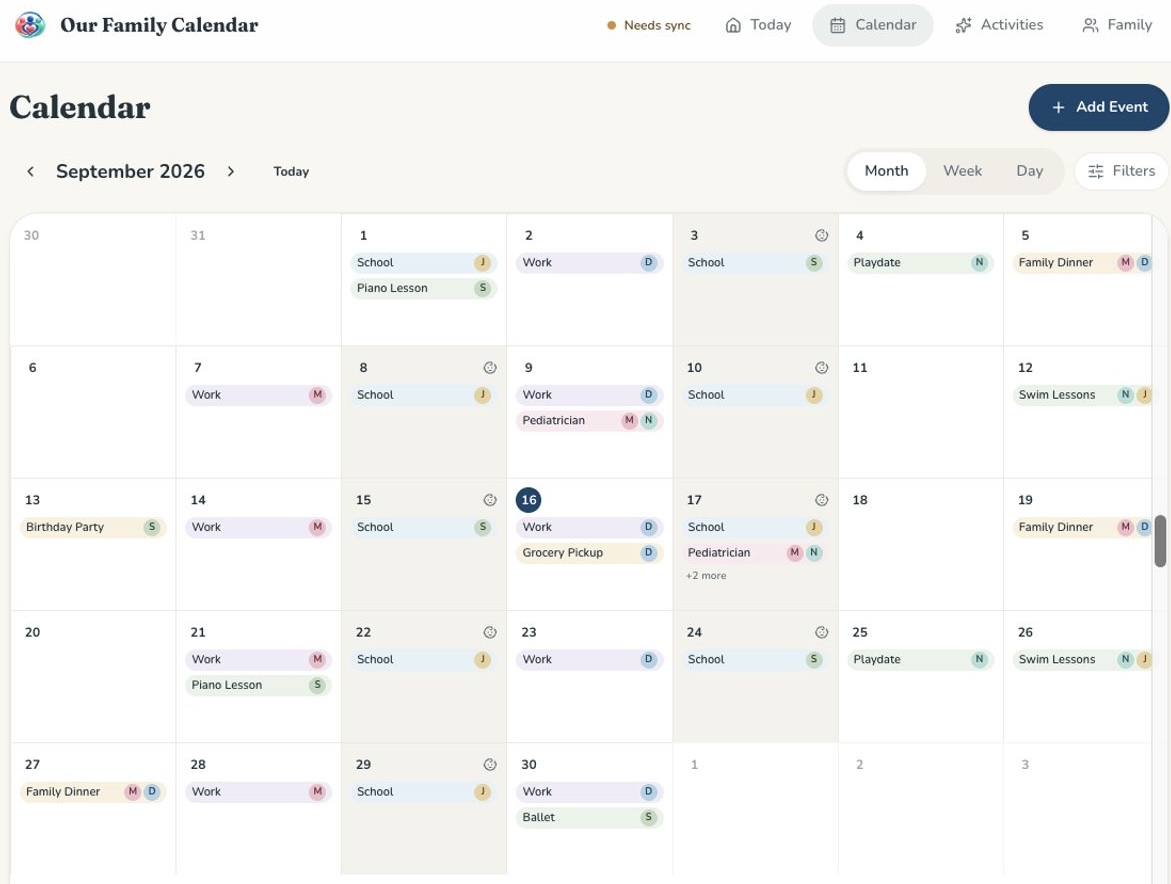
School, sports, appointments, work schedules, childcare and last-minute changes end up spread across texts, calendars and conversations.
"Everyone shouldn't need another text message to know what's happening."
Our Family Calendar gives your household one shared place to see what's next.
See how the shared family calendar works, or compare shared calendar apps.
Know who an activity belongs to without opening every event.
See babysitter or caregiver coverage alongside the rest of the family schedule.
Zoom into today or see the entire family schedule.
Keep using the calendars you already rely on.
Plan nanny shifts and babysitter coverage right in the family calendar, then track the hours — all in one place.
Plan recurring nanny shifts and occasional babysitter coverage alongside family activities.
Caregivers record their actual hours against the shifts you scheduled.
Parents review each pay period and confirm the hours.
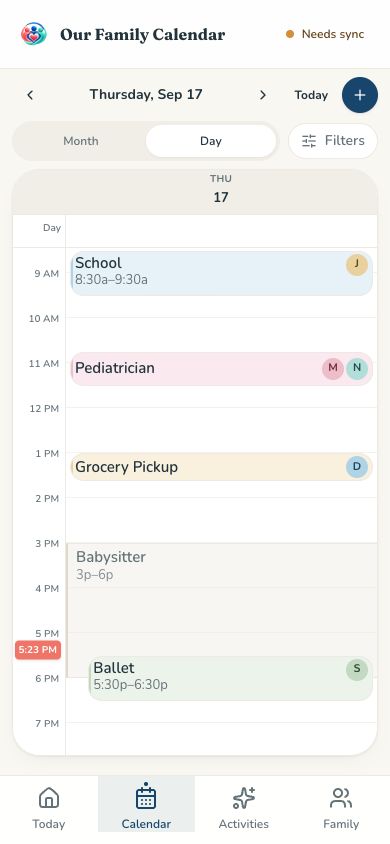
See activities, times, family members and childcare coverage in one clear daily view — wherever you are.
Invite grandparents, babysitters and other caregivers with exactly the access they need — and nothing more.
Add parents, kids and anyone whose schedule matters.
Bring in Google Calendar events instead of rebuilding your schedule.
Give each person the access they need.
Check the schedule from a phone or computer.
No meal planner. No recipe collection. No chore economy. No new screen for your kitchen. Our Family Calendar focuses on the shared schedule itself — including childcare shifts, caregiver access and timesheets that typical organizers and wall-calendar devices don't handle the same way.
See the full comparison with Cozi and Skylight.
Daily, weekly and monthly family summaries help everyone see what's ahead without constantly checking another app.
A shared family calendar is one calendar your whole household can see. School, sports, work, appointments and childcare all live in one place, so everyone knows what is happening next without texting each other to ask.
Yes. You can connect Google Calendar so the events your family already relies on show up in Our Family Calendar — no rebuilding your schedule from scratch.
Yes. Plan recurring nanny shifts or occasional babysitter coverage alongside family activities. Invite your caregiver with view-only access, choose which calendars they can see, and optionally limit their view to assigned shift days.
Yes. Every family member gets their own color and initials, so you can tell who an activity belongs to at a glance without opening the event.
Yes. Our Family Calendar works on phones, tablets and computers — there is no special hardware to buy or install.
No. You can add family members to your household without an account — including kids — and they still get their own color and place on the schedule. Adults and caregivers you invite can sign in to see the calendar themselves.
Yes. Each household's calendar is only visible to the people you invite to it.
Yes. If you use a compatible AI assistant, you can connect it to your Our Family Calendar account to ask about upcoming events and schedules. It is read-only, and it can only see what that signed-in household member can already see in the app.